 Post by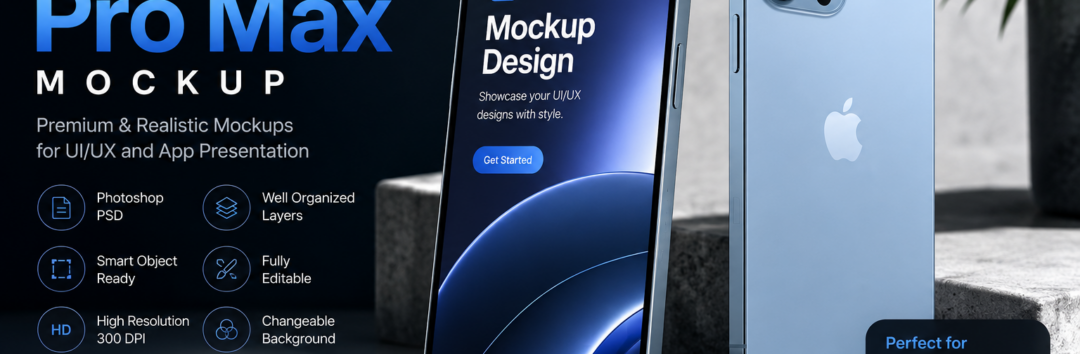
Discover the best iPhone 13 Pro Max mockup resources for Photoshop and Figma. Learn how to use editable PSD templates, Smart Objects, UI presentations, branding mockups, and professional design techniques to showcase your apps and products.
iPhone 13 Pro Max Mockup: The Complete Guide to Professional App & Product Presentations
Creating an outstanding digital product is only half the battle. The other half is presenting it in a way that immediately captures attention, builds credibility, and helps clients or customers visualize the final experience. This is where an iPhone 13 Pro Max mockup becomes an essential tool for designers, developers, marketers, and business owners.
Whether you’re showcasing a new mobile application, presenting a website redesign, launching a digital product, or building a professional portfolio, a realistic Device Mockup can dramatically improve how your work is perceived. Instead of displaying plain screenshots, you can place your interface inside a beautifully designed Apple device, giving viewers a realistic preview of how your design will appear in everyday use.
Today’s designers have access to hundreds of mockup styles. You can choose a minimalist studio scene, a premium workspace setup, an elegant Flat Lay Mockup, a stylish Standing iPhone Mockup, or even a futuristic 3D Rendering Mockup. Each style serves a different purpose depending on your audience and branding goals.
Modern mockups have also become incredibly easy to customize. Most premium and free resources include an editable iPhone 13 Pro Max PSD featuring organized Layered PSD files. Using Smart Object technology or an editable Smart Layer, replacing your screen design takes only a few seconds. Simply paste your artwork, save the file, and Photoshop automatically creates a realistic device presentation.
Designers working inside Figma are equally fortunate. A growing collection of Figma Mockup templates allows teams to build beautiful UI/UX Presentation layouts without leaving their design workflow. This speeds up collaboration while making presentations consistent across multiple projects.
The popularity of mobile-first products has made professional mockups more valuable than ever. Companies launching startups, SaaS platforms, ecommerce applications, fintech products, healthcare apps, educational platforms, and gaming experiences all rely on realistic App Screen Mockup files to communicate quality before development is even complete.
A well-designed mockup does more than display an interface—it tells a story. The lighting, composition, shadows, materials, and surrounding environment create emotional appeal while reinforcing brand identity. This is why agencies often use premium Product Mockup collections for client presentations, landing pages, investor decks, and marketing campaigns.
Throughout this guide, you’ll learn everything you need to know about choosing the right mockup, customizing PSD templates, working with Figma files, understanding different presentation styles, and creating visuals that leave a lasting impression.
What Is an iPhone 13 Pro Max Mockup?
An iPhone 13 Pro Max mockup is a professionally designed template that allows designers to insert their own interface, branding, website, or application into a realistic image of Apple’s flagship smartphone. Instead of manually creating photorealistic device renders, designers can use an Editable Mockup to produce polished visuals in minutes.
Most templates include an organized Layered PSD, making every design element easy to edit. Whether you need to adjust lighting, reflections, shadows, or background elements, every layer remains separate and fully customizable.
The most common editing method uses a Smart Object, which acts like a container for your artwork. After opening the Smart Object, you simply replace the existing image with your own design. Once saved, Photoshop automatically updates the entire composition while preserving realistic perspective, reflections, and device details.
Some designers prefer using a dedicated Smart Layer, which provides the same convenience while allowing additional adjustments to opacity, blending, and masking. This workflow has become an industry standard because it eliminates repetitive manual editing.
Professional templates typically include features such as:
- Fully editable iPhone 13 Pro Max PSD
- Organized Layered PSD
- One-click Screen Replacement
- Easy Design Upload
- Customizable Display Content
- High-quality High-Resolution Mockup
- Print-ready 300 DPI
- Adjustable reflections and highlights
- Editable shadows
- Separate object layers
- Commercial-use friendly layouts
Because Apple’s display is incredibly sharp, premium templates preserve the exact Screen Resolution 2778×1284, allowing designers to present interfaces with exceptional clarity. Combined with realistic Retina Display Mockup quality, every icon, button, image, and typography element appears crisp and professional.
These mockups are commonly used for:
- Startup landing pages
- Mobile app launches
- SaaS marketing websites
- Portfolio presentations
- Behance projects
- Dribbble showcases
- UI case studies
- Ecommerce product pages
- Social media marketing
- Investor pitch decks
The versatility of a professional Apple Device Mockup makes it suitable for nearly every creative industry.
Why Designers Prefer Professional iPhone 13 Pro Max Mockups
The difference between a simple screenshot and a premium presentation is often dramatic. While screenshots communicate functionality, mockups communicate value.
Imagine presenting a food delivery application. A flat screenshot simply displays the interface. However, placing the same interface inside a realistic Front View Mockup instantly creates context, making the product feel closer to a finished commercial application.
Similarly, a Front and Back Mockup gives viewers a complete perspective of the device while emphasizing Apple’s elegant industrial design. This style is particularly useful for ecommerce brands selling accessories or mobile applications.
Many UI designers also prefer a Top View Mockup because it creates a clean composition for presentations and website hero sections. Combined with subtle desk accessories, notebooks, keyboards, or coffee cups, the design feels more authentic and relatable.
Creative agencies often use an Isometric Mockup to add depth and modern aesthetics to websites. These angled presentations are especially popular in SaaS marketing because they create a three-dimensional appearance while maintaining simplicity.
When showcasing multiple app screens, designers frequently rely on Mobile UI Mockup collections that include several devices arranged together. These layouts are perfect for demonstrating onboarding flows, dashboards, profile pages, payment screens, or navigation systems.
Another popular choice is a Responsive App Preview, where multiple device sizes are displayed together to illustrate responsive behavior across products. This approach works exceptionally well for software companies launching cross-platform experiences.
For marketing campaigns, a Branding Mockup extends beyond simply displaying the interface. It incorporates logos, colors, typography, and supporting visuals into a cohesive composition that reinforces the company’s identity.
Many freelancers also build stronger portfolios using a clean Portfolio Presentation format. Rather than uploading raw screenshots, they present polished visuals that demonstrate professionalism and attention to detail.
Design studios frequently create complete UI Design Showcase projects combining multiple mockup styles, user flows, typography systems, and branding assets. These presentations help clients better understand the design process while increasing confidence in the final product.
During product demonstrations, a polished Mobile Interface Presentation helps investors and stakeholders visualize real-world usage scenarios. Similarly, a detailed App Prototype Presentation transforms early-stage concepts into convincing product demonstrations long before development is completed.
Professional presentations also benefit from advanced customization features such as:
- Adjustable Changeable Background settings
- Editable Background Color
- Realistic Separated Shadows
- Easy Object Isolation
- Studio-quality lighting
- Reflection controls
- Premium textures
- Multiple viewing angles
These editing options make it possible to create a Minimal Mockup for corporate branding, a Clean Mockup for UI case studies, or a luxurious Premium Mockup suitable for product launches.
Some templates even include multiple device finishes such as a Sierra Blue iPhone Mockup or Gold iPhone Mockup, allowing designers to match presentations with brand colors or campaign aesthetics.
Whether you’re designing a fintech dashboard, healthcare application, ecommerce platform, educational app, or social networking product, investing in a realistic mockup significantly improves visual storytelling. Instead of merely displaying pixels on a screen, you’re presenting a believable user experience that connects with your audience.
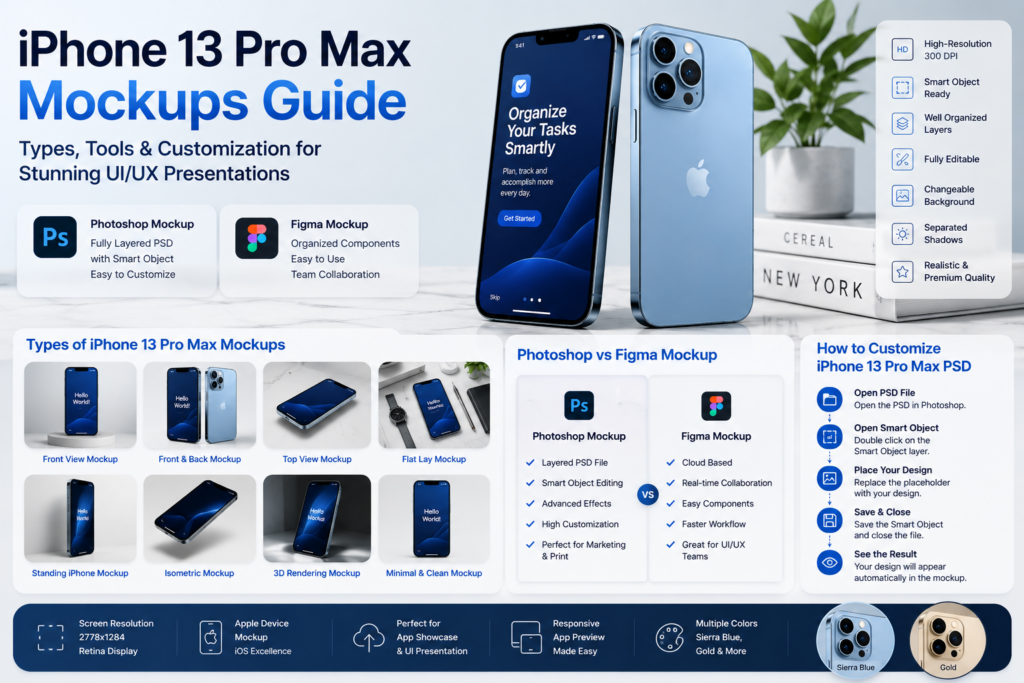
Types of iPhone 13 Pro Max Mockups for Every Design Project
Not all mockups serve the same purpose. The right iPhone 13 Pro Max mockup depends on where your design will be displayed, who your audience is, and what story you want your visuals to tell. A mockup used for an App Store landing page differs greatly from one intended for a Behance portfolio or a client presentation.
Professional designers often maintain a library of mockups so they can choose the perfect style for every project. Below are the most popular categories and when to use each one.
Front View Mockup
The Front View Mockup is the most versatile option because it places all attention on your interface. Since viewers see the display straight on, every detail—from typography to icons—remains perfectly legible.
This style is ideal for:
- Mobile app landing pages
- SaaS product websites
- App Store screenshots
- UI case studies
- Software marketing campaigns
Because the perspective is straightforward, designers frequently use it for an App Showcase where clarity is more important than artistic composition.
Front and Back Mockup
A Front and Back Mockup displays both sides of the device simultaneously, highlighting Apple’s premium industrial design while keeping your interface visible.
This presentation works especially well for:
- Product advertisements
- Accessory brands
- Packaging concepts
- Technology blogs
- Device comparison articles
Showing both sides of the phone gives the composition a more complete and premium appearance.
Top View Mockup
A Top View Mockup offers a bird’s-eye perspective that feels modern and editorial. It is commonly paired with workspace elements such as keyboards, notebooks, coffee cups, headphones, or stationery.
Designers choose this style for:
- Blog featured images
- Creative portfolios
- Agency websites
- Social media graphics
- Branding campaigns
The clean composition naturally draws attention to the screen while maintaining plenty of negative space for headlines.
Flat Lay Mockup
A Flat Lay Mockup has become one of the most recognizable styles in digital marketing. Instead of isolating the phone, the device is placed among carefully arranged lifestyle objects.
Typical elements include:
- Glasses
- Coffee mugs
- Pens
- Laptops
- Plants
- Cameras
- Books
- Office accessories
This creates an authentic environment that helps audiences imagine the product in everyday life.
Lifestyle-oriented brands particularly benefit from flat lay compositions because they feel less promotional and more relatable.
Standing iPhone Mockup
A Standing iPhone Mockup positions the phone vertically, often using subtle shadows and reflections to create depth.
This format is popular for:
- Homepage hero banners
- Mobile app advertisements
- Startup presentations
- Product launch pages
- Investor pitch decks
The upright orientation immediately captures attention while maximizing screen visibility.
Isometric Mockup
An Isometric Mockup presents the phone from an angled perspective that creates a three-dimensional effect without overwhelming the design.
Technology startups frequently use this style because it feels modern and premium.
Benefits include:
- Better depth perception
- More dynamic composition
- Professional SaaS aesthetic
- Improved visual hierarchy
- Excellent website hero graphics
Many software companies combine several isometric devices to demonstrate complete application workflows.
3D Rendering Mockup
If realism is your priority, a 3D Rendering Mockup delivers exceptional results.
These templates often include:
- Studio lighting
- Realistic reflections
- Physically accurate materials
- Soft ambient shadows
- High-quality metal textures
Unlike simple flat templates, these mockups closely resemble professional product photography.
They are frequently used for:
- Advertising campaigns
- Product launches
- Premium ecommerce websites
- Corporate presentations
Minimal Mockup
Sometimes simplicity creates the strongest impact.
A Minimal Mockup removes unnecessary distractions, leaving only the smartphone against a neutral background.
Advantages include:
- Better focus on the interface
- Faster loading web pages
- Cleaner presentations
- Timeless visual style
Minimal mockups remain one of the safest choices for agencies and SaaS businesses.
Clean Mockup
Although similar to minimal styles, a Clean Mockup emphasizes precision, balanced spacing, and subtle lighting.
They work particularly well for:
- Healthcare apps
- Financial applications
- Enterprise dashboards
- Productivity software
- Educational platforms
The clean aesthetic communicates trust and professionalism.
Premium Mockup
For high-end branding projects, a Premium Mockup often includes advanced lighting effects, luxury materials, realistic reflections, and carefully crafted compositions.
Premium mockups are commonly used by:
- Creative agencies
- Luxury brands
- Corporate marketing teams
- Global startups
- Professional UI designers
When first impressions matter, investing in premium assets can significantly elevate the perceived quality of your work.
Photoshop Mockup vs Figma Mockup
One of the most common questions among designers is whether they should work with a Photoshop Mockup or a Figma Mockup.
The answer depends on your workflow.
Photoshop Mockup
Photoshop remains the industry standard for highly realistic device presentations.
Most premium mockups include:
- Organized Layered PSD
- Editable Smart Object
- Separate Smart Layer
- Realistic reflections
- Editable lighting
- High-quality textures
- Print-ready 300 DPI
- Professional High-Resolution Mockup files
Using Photoshop, replacing your interface is extremely simple.
Typical workflow:
- Open the PSD.
- Double-click the Smart Object.
- Replace the existing design.
- Save the Smart Object.
- Watch the mockup update automatically.
This process takes less than a minute while producing highly realistic results.
Figma Mockup
As collaborative design becomes more common, the Figma Mockup has become increasingly popular.
Advantages include:
- Browser-based editing
- Real-time collaboration
- Easy design sharing
- Component libraries
- Faster iterations
- No PSD exports required
Teams designing complete products often create mockups directly inside Figma before exporting presentation assets.
This keeps the entire design workflow inside one application.
Which One Should You Choose?
Choose Photoshop Mockup if you need:
- Ultra-realistic presentations
- Marketing graphics
- Product advertisements
- Website hero images
- Print materials
Choose Figma Mockup if you need:
- Collaborative workflows
- Rapid prototyping
- UI reviews
- Design systems
- Team presentations
Many professional agencies actually use both tools together.
Designs are created in Figma and exported into Photoshop for final presentation-quality visuals.
How to Customize an iPhone 13 Pro Max PSD Like a Professional
One of the biggest reasons designers prefer an editable iPhone 13 Pro Max PSD is flexibility.
Instead of creating realistic device renders manually, nearly every visual element can be customized within minutes.
Replace Your Screen Design
Most templates provide automatic Screen Replacement.
Simply perform your Design Upload using the embedded Smart Object.
Your new Display Content immediately appears with correct perspective, reflections, and lighting.
Adjust the Background
Many premium mockups offer a fully Changeable Background.
You can modify:
- Solid colors
- Gradients
- Studio scenes
- Office environments
- Lifestyle settings
- Outdoor photography
Changing the Background Color helps align the presentation with your brand identity.
Edit Shadows
Professional templates include editable Separated Shadows.
Independent shadow layers let you:
- Increase realism
- Match lighting
- Create floating effects
- Produce softer compositions
Good shadow control makes even simple presentations appear significantly more premium.
Object Isolation
Advanced templates often support Object Isolation.
This means the phone can be exported with a transparent background for:
- Website banners
- Marketing graphics
- Social media posts
- Landing pages
- PowerPoint presentations
Object isolation also makes it easier to combine multiple devices into one custom composition.
Professional Tips for Better Mockup Presentations
Creating an impressive mockup involves more than inserting a screenshot.
Keep these best practices in mind:
Use High-Quality Screens
Low-resolution screenshots reduce credibility.
Always export crisp interfaces that match the device’s Screen Resolution 2778×1284 to preserve sharp details.
Preserve Retina Quality
A professional Retina Display Mockup should display text, icons, and images with exceptional clarity.
Avoid stretching or compressing screenshots.
Match Your Brand
When creating an Apple Device Mockup, keep your presentation consistent with your visual identity.
Use:
- Brand typography
- Brand colors
- Consistent spacing
- Matching imagery
This creates a cohesive Branding Mockup suitable for professional marketing materials.
Tell a Story
Rather than showing random screens, arrange your interface to create a logical Mobile App Presentation.
For example:
- Login
- Dashboard
- Analytics
- Checkout
- Success screen
This sequence creates a compelling App Prototype Presentation while functioning as a polished UI/UX Presentation.
Similarly, a complete Mobile Interface Presentation can demonstrate navigation flows and user interactions, making it ideal for client meetings or investor demos.
For designers building a public portfolio, combining several presentation styles into a polished UI Design Showcase enhances credibility. Displaying multiple screens within a consistent Mockup Template also creates a more engaging Portfolio Presentation that highlights both creativity and attention to detail.
Whether you’re creating a single iOS App Mockup for a landing page or assembling a comprehensive Mockup Bundle for commercial projects, thoughtful presentation can make the difference between an interface that is merely seen and one that is remembered.
Best Use Cases for an iPhone 13 Pro Max Mockup
An iPhone 13 Pro Max mockup is much more than a presentation asset—it’s a marketing tool that helps communicate professionalism, usability, and brand value. Whether you’re a freelance designer or part of an enterprise product team, choosing the right mockup can make your work stand out.
1. Mobile App Launches
Launching a new app? A realistic iOS App Mockup instantly makes promotional graphics look more polished than simple screenshots.
Ideal for:
- App Store landing pages
- Product Hunt launches
- Startup websites
- Press kits
- Product announcements
Displaying your application inside a premium device creates trust and encourages potential users to explore your product.
2. UI/UX Case Studies
UX designers often need to explain not only what they designed but why.
Using multiple mockups allows you to create a complete UI Design Showcase demonstrating:
- User onboarding
- Navigation
- Search experience
- Checkout flow
- Dashboard interactions
- User profile screens
These presentations are particularly valuable on Behance, Dribbble, and personal portfolios.
3. Client Presentations
Instead of sending plain interface screenshots, present your work using a realistic Professional Device Presentation.
Clients typically find it easier to visualize the finished product when they see it inside a premium smartphone.
This often leads to:
- Faster approvals
- Better communication
- More client confidence
- Higher perceived project value
4. Marketing & Advertising
Marketing teams regularly use mockups for:
- Facebook Ads
- Instagram campaigns
- LinkedIn promotions
- Email marketing
- Landing pages
- Website banners
A realistic presentation increases visual appeal and helps users understand the product before downloading it.
5. Portfolio Development
A designer’s portfolio is often the first impression for potential clients or employers.
Combining realistic mockups with project explanations creates a stronger Portfolio Presentation, showcasing both technical ability and design thinking.
Instead of uploading isolated screens, build a story around your work with consistent compositions, lighting, and branding.
How to Choose the Best iPhone 13 Pro Max Mockup
With thousands of free and premium templates available, selecting the right one can feel overwhelming. The best choice depends on your project goals.
Consider Your Audience
Ask yourself:
- Is this for clients?
- Is this for investors?
- Is this for social media?
- Is this for a portfolio?
- Is this for ecommerce?
Each audience responds differently to presentation styles.
Match the Mockup to Your Brand
A fintech startup may benefit from a sleek, minimal presentation, while a lifestyle app could look better in a realistic desk scene.
Keep the following elements consistent:
- Typography
- Color palette
- Lighting
- Background
- Composition
Consistency strengthens your brand identity.
Prioritize Editability
Choose templates that include:
- Organized layers
- Editable Smart Objects
- High resolution
- Commercial licensing
- Multiple viewing angles
The easier a mockup is to edit, the more time you’ll save on future projects.
Look for Premium Features
Professional designers often prefer templates that include:
- Multiple device angles
- Editable reflections
- Realistic shadows
- Transparent backgrounds
- Color customization
- Organized layer groups
These features make creating marketing materials much faster.
Common Mistakes to Avoid
Even excellent interfaces can look unprofessional if presented poorly.
Using Low-Resolution Screens
Blurry screenshots immediately reduce credibility.
Always export images at the correct device size.
Overcrowding the Composition
Too many decorative objects distract viewers.
Allow your interface to remain the focal point.
Ignoring Brand Colors
Backgrounds, typography, and accessories should complement your branding rather than compete with it.
Using Unrealistic Lighting
Ensure reflections and shadows match the overall scene.
Professional lighting creates a premium appearance.
Mixing Different Styles
Avoid combining minimalist mockups with highly detailed lifestyle scenes in the same project unless there is a clear creative reason.
A consistent visual language strengthens the final presentation.
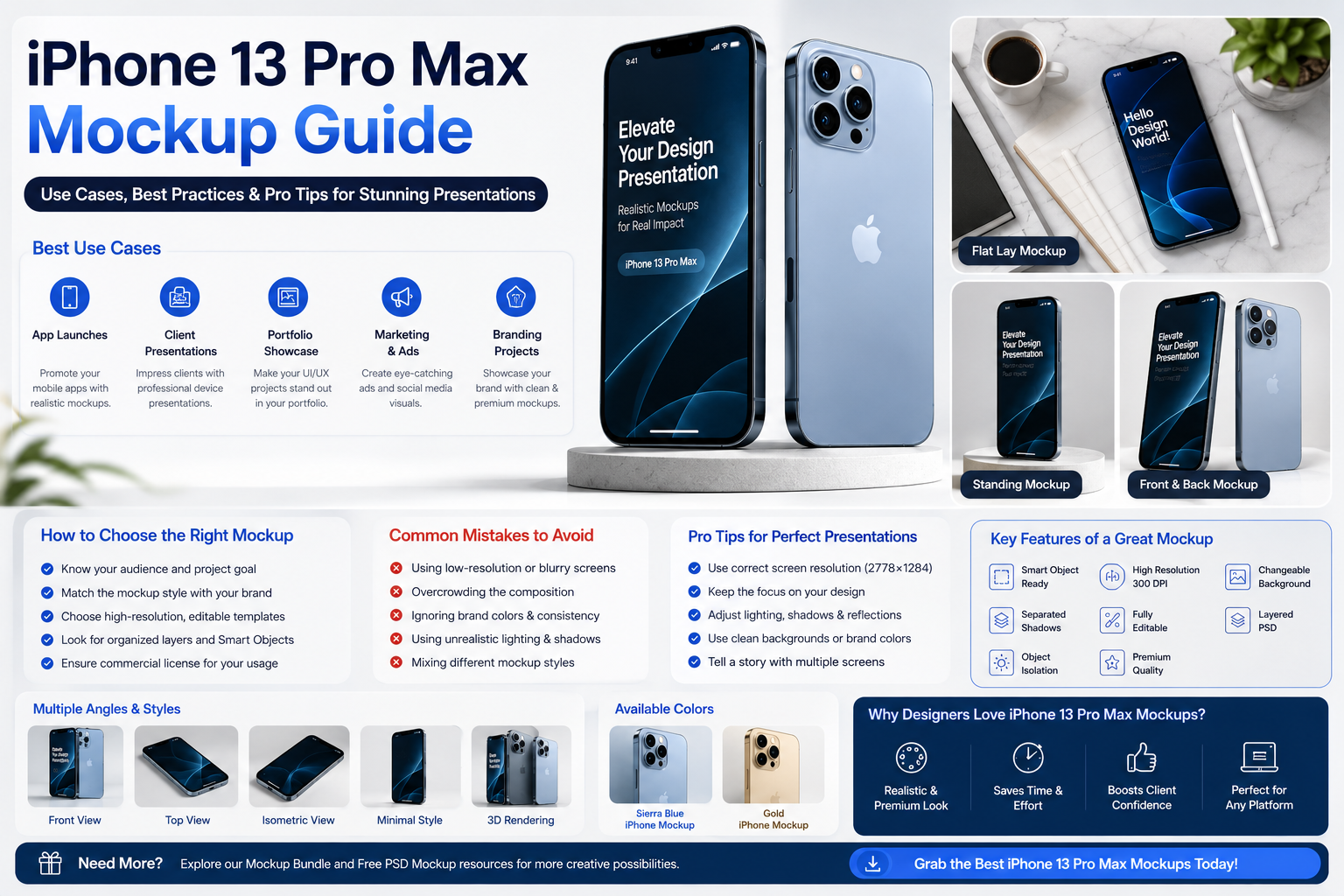
FAQ: iphone 13 pro max mockup
1. What is an iPhone 13 Pro Max mockup?
It is a customizable design template that lets you present app screens, websites, or branding inside a realistic iPhone 13 Pro Max.
2. What file format is most common?
PSD files with Smart Objects are the industry standard.
3. Can beginners use Photoshop mockups?
Yes. Most templates only require replacing a Smart Object with your design.
4. Are Figma mockups good?
Absolutely. They are ideal for collaborative UI design workflows.
5. What resolution should my screenshots be?
For the best quality, export images that match the device’s native resolution whenever possible.
6. Are free mockups suitable for commercial work?
Some are, but always review the license before using them commercially.
7. Why are Smart Objects useful?
They automate screen replacement while preserving perspective and effects.
8. Can I change the background?
Most premium mockups include editable backgrounds.
9. Which mockup angle is best?
Front-view mockups are best for UI clarity, while isometric and lifestyle scenes work well for marketing.
10. Are mockups useful for startups?
Yes. They help present products professionally before launch.
11. Can I use mockups in client presentations?
Yes, they are widely used by agencies and freelancers.
12. What software is required?
Adobe Photoshop is the most common, though many mockups are available for Figma.
13. What is a layered PSD?
A PSD with organized editable layers for easy customization.
14. Why is 300 DPI important?
It provides excellent print quality and sharp marketing graphics.
15. Can I edit shadows?
Most premium PSD files include editable shadow layers.
16. What is object isolation?
It allows you to export the phone with a transparent background.
17. Are mockups useful for portfolios?
Yes, they make projects look significantly more professional.
18. Which industries use device mockups?
Technology, healthcare, finance, education, ecommerce, SaaS, and entertainment.
19. Can I showcase multiple screens?
Yes. Many templates support multi-screen layouts.
20. Are mockup bundles worth buying?
If you create presentations regularly, bundles provide excellent long-term value.
21. Can I customize reflections?
Many premium mockups allow reflection adjustments.
22. Are transparent PNG exports possible?
Yes, if the template supports transparent backgrounds.
23. Can mockups improve marketing?
Professional visuals generally increase engagement and perceived quality.
24. Should I use lifestyle scenes?
Yes, when they reinforce your brand story without distracting from the design.
25. Can developers use mockups?
Absolutely. They help communicate features before release.
26. Are mockups suitable for presentations?
Yes, they are commonly used in sales, investor, and client presentations.
27. What makes a mockup look realistic?
Accurate lighting, shadows, reflections, and high-resolution assets.
28. How many mockups should a designer own?
A small library covering different angles and styles is usually sufficient.
29. Can I use the same mockup repeatedly?
Yes, but varying styles keeps your portfolio fresh.
30. Which mockup style converts best?
The best style depends on your audience, but clean, realistic, and high-quality presentations generally perform well.
Conclusion
A professionally designed iPhone 13 Pro Max mockup is one of the simplest ways to elevate the presentation of your digital products. Whether you’re designing a mobile application, creating marketing assets, building a portfolio, or pitching a startup idea, the right mockup transforms ordinary screenshots into compelling visual stories.
By choosing an editable, high-quality template and customizing it thoughtfully, you can highlight your interface, reinforce your brand, and leave a lasting impression on clients, stakeholders, and users. From minimalist layouts to realistic lifestyle scenes, every mockup style serves a unique purpose, helping you communicate your design with clarity and confidence.
As your design library grows, investing in versatile templates will save time, improve consistency, and make every project look more polished. A strong presentation isn’t just about aesthetics—it reflects the quality and professionalism behind your work.
Also Read: What Is a Mockup Generator and How Does It Work? Complete Beginner’s Guide (2026)