
 Post by
Are you looking for T-Shirt with Hanger Mockup: Complete Guide to PSD Mockups, Branding & Product Presentation ?
Discover everything about T-shirt with hanger mockups, including PSD mockups, Smart Objects, apparel branding, print-on-demand, design placement, and professional product presentation. Learn how to create realistic mockups for ecommerce and fashion brands.
T-Shirt with Hanger Mockup: The Ultimate Guide to Professional Apparel Presentation
When customers shop online, they can’t touch the fabric, feel the texture, or try on the clothing. Their buying decision depends almost entirely on visuals. That’s why a T-shirt on hanger mockup has become one of the most valuable tools for clothing brands, designers, print-on-demand sellers, and ecommerce businesses.
A professionally designed hanging T-shirt mockup presents your artwork in a clean, realistic environment that closely resembles how products appear in retail stores or fashion boutiques. Instead of displaying a flat design, you can showcase your graphics on a neatly hung shirt, instantly giving customers a better understanding of the product’s fit, style, and overall appearance.
Whether you’re launching a fashion startup, managing a merchandise store, creating client presentations, or building a print-on-demand business, the right apparel mockup can dramatically improve the perceived value of your designs. A realistic mockup communicates professionalism, strengthens your brand identity, and helps potential buyers visualize themselves wearing the product.
Today’s mockups go far beyond simple image editing. Most premium files include an Editable PSD with Smart Object functionality, allowing you to replace placeholder artwork with your own design in seconds. This makes design upload and design placement incredibly simple, even for beginners with limited Photoshop experience.
Another reason these mockups are so popular is their versatility. A round neck T-shirt mockup, crew neck T-shirt, or even an oversized T-shirt mockup can be customized for multiple industries, including:
- Fashion startups
- Clothing brands
- Print-on-demand businesses
- Etsy sellers
- Amazon Merch creators
- Shopify stores
- Brand agencies
- Social media marketing
- Product catalogs
- Ecommerce websites
Rather than organizing expensive product photoshoots, brands can use high-quality mockups to launch products faster while maintaining a premium visual identity.
In this comprehensive guide, you’ll learn everything about creating professional apparel presentations using PSD mockups, selecting the right templates, customizing colors, presenting branding effectively, and maximizing conversions through realistic product visualization.
What Is a T-Shirt with Hanger Mockup?
A T-shirt with hanger mockup is a digital product visualization template that displays a T-shirt hanging naturally on a wooden hanger or clothes hanger, allowing designers to showcase logos, illustrations, typography, and artwork before manufacturing or selling the actual product.
Unlike flat-lay mockups, a hanger presentation feels more authentic because it mimics the appearance customers expect inside retail clothing stores. The shirt hangs naturally, creating realistic folds, shadows, and fabric movement that enhance the final presentation.
Most professional mockups include an Editable PSD file compatible with Adobe Photoshop mockup workflows. Thanks to Smart Object layers, designers simply replace the placeholder graphic with their own artwork, save the file, and instantly see a photorealistic result.
This workflow saves hours of manual editing while producing consistent, high-quality visuals.
Why Hanging Mockups Feel More Premium
Imagine visiting two online clothing stores.
The first store displays a simple JPEG of a T-shirt lying flat on a white background.
The second store showcases the same shirt hanging neatly on a premium wooden hanger inside a modern studio.
Which brand appears more trustworthy?
Most shoppers naturally perceive the second option as higher quality.
That’s because a clothing branding mockup creates context. Instead of looking like clipart, the product resembles an actual retail item ready for purchase.
This small psychological difference often leads to better customer engagement.
Different Types of T-Shirt Hanger Mockups
Modern designers have access to dozens of mockup styles depending on their project goals.
Blank T-Shirt Mockup
A blank T-shirt mockup provides a clean canvas for displaying artwork without distractions. These are commonly used by print-on-demand businesses because they highlight the design itself rather than surrounding props.
Round Neck T-Shirt Mockup
The round neck T-shirt mockup remains one of the most popular apparel templates because round-neck shirts dominate casual fashion worldwide.
Fashion startups frequently choose this format for launching new collections.
Crew Neck T-Shirt
A crew neck T-shirt offers another classic style that works perfectly for lifestyle brands, sportswear companies, and promotional merchandise.
Its timeless appearance makes it suitable for almost every audience.
Oversized T-Shirt Mockup
Streetwear brands increasingly prefer an oversized T-shirt mockup because relaxed silhouettes continue dominating modern fashion trends.
These mockups typically emphasize loose fabric, oversized sleeves, and contemporary styling.
White T-Shirt Mockup
A white T-shirt mockup provides maximum design contrast, making colorful graphics and bold typography stand out beautifully.
White templates are especially popular for minimalist clothing brands.
Black T-Shirt Mockup
Similarly, a black T-shirt mockup creates dramatic presentations for luxury brands, music merchandise, gaming apparel, and premium fashion collections.
Dark garments often make bright artwork appear more vibrant.
Unisex T-Shirt Mockup
A unisex T-shirt mockup is ideal for businesses selling gender-neutral apparel. Rather than creating separate presentations for men’s and women’s collections, brands can market one universal design across broader audiences.
Why Designers Prefer PSD Mockups
Professional designers rarely create apparel presentations from scratch anymore.
Instead, they rely on high-quality PSD mockup files because they save time while maintaining excellent visual quality.
A premium PSD typically includes:
- Fully layered PSD
- Clearly organized layers
- Editable shadows
- Adjustable highlights
- Realistic fabric wrinkles
- Color customization
- Background editing
- Smart Object support
This combination allows almost anyone to produce studio-quality product visuals without advanced Photoshop skills.
For agencies working with multiple clients, these templates dramatically reduce production time while ensuring consistent branding across every campaign.
The Power of Smart Objects
One feature separates professional mockups from ordinary image templates:
Smart Object technology.
Instead of manually warping artwork onto fabric, designers simply:
- Open the Smart Object layer.
- Replace the placeholder artwork.
- Save the Smart Object.
- Return to the main file.
Photoshop automatically applies perspective, wrinkles, lighting, and shadows to the design.
This simple workflow makes design upload effortless while ensuring accurate design placement across every product variation.
Even beginners can create realistic apparel previews within minutes.
Realistic Product Presentation Builds Trust
Consumers judge products within seconds.
If the product presentation looks amateur, they often assume the product quality is equally poor.
That’s why investing in a realistic product presentation mockup matters.
Professional mockups typically include:
- Natural wrinkles
- Authentic fabric texture
- Realistic lighting
- Accurate garment folds
- Premium composition
- Soft shadows
- Balanced color grading
Together, these details create a photorealistic mockup that closely resembles professional fashion photography.
Rather than appearing digitally edited, the shirt feels tangible and ready to wear.
Why Minimalism Works So Well
Many successful fashion brands intentionally choose a minimalist mockup because it directs all attention toward the apparel itself.
A clean isolated background, subtle studio lighting, and simple hanger arrangement eliminate distractions while emphasizing the clothing design.
Minimal presentations also fit seamlessly into modern ecommerce websites, landing pages, product catalogs, and social media advertisements.
This style has become increasingly popular because it supports virtually every branding aesthetic—from luxury fashion to streetwear startups.
Custom Colors Make Every Design Unique
One of the biggest advantages of modern mockups is the ability to change garment colors instantly.
Most templates include customizable T-shirt color options, allowing designers to preview collections in multiple shades without photographing every variation.
For example, a single design can be displayed on:
- White
- Black
- Navy
- Red
- Olive
- Beige
- Charcoal
- Pastel tones
This flexibility helps clothing brands test new collections before investing in manufacturing.
Instead of ordering physical samples, designers can present multiple colorways digitally and gather customer feedback.
The Importance of Cotton Texture
Today’s buyers appreciate realism.
That’s why premium mockups carefully replicate cotton T-shirt materials through detailed fabric texture rendering.
Small details such as stitching, folds, weave patterns, and subtle shadows create authenticity that flat digital graphics simply cannot match.
For premium fashion labels, these realistic textures help reinforce quality, craftsmanship, and trustworthiness.
Features of a High-Quality Mockup Template
Choosing the right Mockup template can significantly impact how your products are perceived. While thousands of templates are available online, not all of them deliver the level of realism, flexibility, and professionalism required for modern ecommerce or fashion branding.
A high-quality template does more than display a design—it tells a visual story about your brand. Whether you’re launching a premium streetwear collection or creating promotional merchandise for an event, the mockup should make the product feel authentic and desirable.
Professional designers usually evaluate mockups based on several important factors:
- High image resolution
- Realistic shadows and highlights
- Editable Smart Objects
- Natural fabric folds
- Organized Photoshop layers
- Accurate garment proportions
- Flexible background editing
- Commercial usage rights
- Color customization
- Professional composition
These features ensure the final presentation looks polished across websites, social media, product catalogs, advertisements, and client presentations.
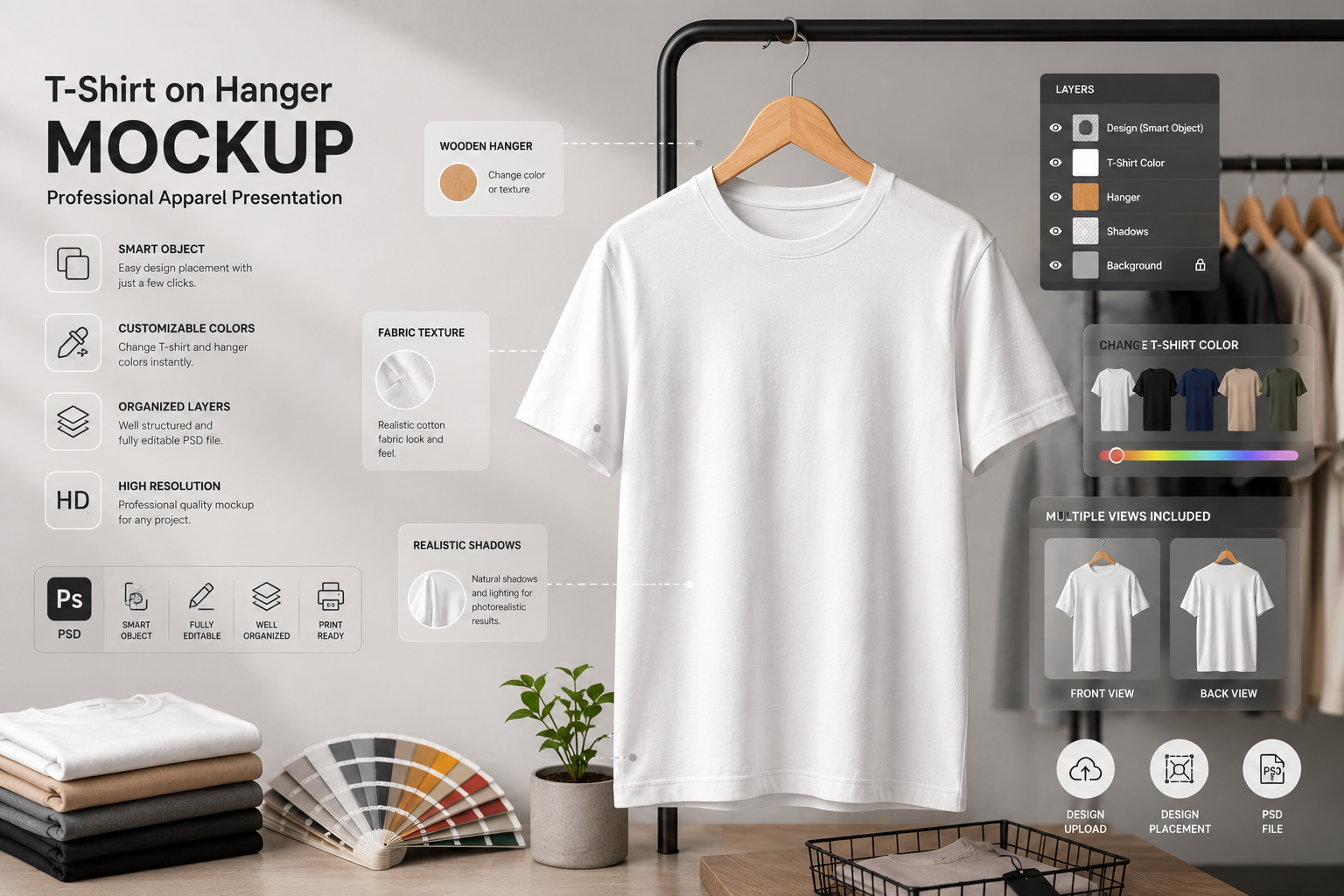
Front View Mockup vs Front and Back Mockup
One common question designers ask is whether they should use a Front view mockup or a Front and back mockup.
The answer depends on the product and the customer’s purchasing decision.
Front View Mockup
A Front view mockup focuses entirely on the main design. This works exceptionally well when:
- The artwork is printed only on the front.
- Creating social media advertisements.
- Designing website banners.
- Building landing pages.
- Running promotional campaigns.
Since customers immediately notice the artwork, front-view presentations create a strong first impression.
For many print-on-demand stores, this is the primary product image.
Front and Back Mockup
A Front and back mockup provides a complete visualization of the garment.
This is especially useful when:
- Logos appear on the back.
- Clothing contains sleeve graphics.
- Neck labels need showcasing.
- Buyers want to inspect the entire product.
- Premium collections emphasize garment construction.
Fashion brands often use multiple product images, allowing customers to rotate through different views before making a purchase.
The additional perspective reduces uncertainty and often improves conversion rates.
Clothing Rack Mockup vs Wooden Hanger Presentation
While hanger mockups remain incredibly popular, another presentation style has gained traction among premium fashion labels—the Clothing rack mockup.
Although both styles serve similar purposes, they create different emotional responses.
Wooden Hanger Display
A simple Wooden hanger creates a boutique-inspired appearance.
Benefits include:
- Minimal distractions
- Premium aesthetic
- Luxury branding
- Clean ecommerce presentation
- Better focus on artwork
Luxury fashion startups frequently prefer wooden hangers because they communicate craftsmanship and elegance.
Clothes Hanger for Everyday Apparel
A standard Clothes hanger feels familiar and practical.
This style works well for:
- Casual clothing brands
- School merchandise
- Sportswear
- Corporate uniforms
- Promotional apparel
The presentation feels approachable while remaining professional.
Clothing Rack Mockup
A Clothing rack mockup places several garments together, creating a retail shopping experience.
This presentation is particularly effective for:
- Seasonal collections
- Fashion lookbooks
- Collection launches
- Store promotions
- Boutique branding
Instead of focusing on one shirt, it communicates an entire clothing line.
Many ecommerce brands combine both styles—using hanger mockups for product pages and clothing rack mockups for homepage banners.
Why High-Resolution Mockups Matter
Image quality directly influences customer trust.
Low-quality images create the impression of inexpensive products, while a High-resolution mockup instantly elevates your brand.
Professional mockups generally include:
- 4000×3000 pixels or larger
- Sharp stitching details
- Accurate fabric texture
- Smooth gradients
- Crisp typography
- High-quality shadows
These large files allow businesses to use the same mockup across multiple marketing channels without losing clarity.
For example, one mockup can appear on:
- Shopify product pages
- Amazon listings
- Etsy stores
- Instagram posts
- Facebook ads
- Pinterest Pins
- Product catalogs
- Print brochures
This versatility saves both time and production costs.
Garment Visualization Makes Products Feel Real
Today’s customers expect immersive shopping experiences.
Instead of imagining how artwork might look on fabric, they want to see it.
That’s where Garment visualization becomes incredibly valuable.
Professional visualization helps customers understand:
- Fabric drape
- Shirt proportions
- Graphic placement
- Color combinations
- Overall style
The more realistic the visualization, the easier it becomes for shoppers to picture themselves wearing the product.
This psychological connection often leads to higher engagement and stronger purchasing intent.
Apparel Branding Presentation That Builds Confidence
Every clothing company wants to appear established—even during its first product launch.
A thoughtful Apparel branding presentation helps achieve exactly that.
Imagine presenting your logo on a professionally photographed shirt instead of a plain digital graphic.
The difference is substantial.
Your presentation begins to resemble major international fashion brands.
Strong branding presentations often include:
- Consistent typography
- Balanced spacing
- Brand colors
- Lifestyle-inspired compositions
- Premium mockups
- Minimal editing
Together, these elements communicate professionalism before customers even read a single product description.
Clothing Brand Presentation for Modern Businesses
Launching a clothing label involves much more than creating attractive graphics.
A successful Clothing brand presentation combines design, storytelling, and consistency.
Professional presentations often showcase:
- Brand identity
- Logo placement
- Signature colors
- Product collections
- Packaging concepts
- Marketing materials
When all visuals follow a consistent style, customers begin recognizing the brand instantly.
Even small startups can compete visually with established companies by investing in premium mockups and cohesive design systems.
Apparel Design Showcase for Client Approval
Freelance designers and creative agencies regularly present concepts before production.
An Apparel design showcase allows clients to visualize finished products without manufacturing physical samples.
Instead of reviewing flat artwork files, clients can immediately understand:
- Print size
- Positioning
- Overall balance
- Visual impact
- Branding consistency
This speeds up approval processes and reduces costly revisions.
Designers can also prepare several color variations using the same PSD file, making presentations more comprehensive and easier to evaluate.
Creating a Powerful Merchandise Mockup
Merchandise has expanded far beyond band T-shirts.
Today, creators, influencers, gaming communities, startups, nonprofits, and educational institutions all sell branded apparel.
A realistic Merchandise mockup helps audiences imagine owning the product.
Popular merchandise categories include:
- Podcast apparel
- YouTube creator merchandise
- Gaming apparel
- College merchandise
- Startup uniforms
- Charity campaigns
- Event souvenirs
- Corporate giveaways
High-quality mockups increase the perceived value of these products before they ever reach production.
Why Print-on-Demand Businesses Depend on Mockups
The rise of ecommerce has made Print-on-demand mockup workflows an essential part of online retail.
Unlike traditional manufacturing, print-on-demand businesses produce products only after customers place orders.
Because physical inventory doesn’t exist beforehand, realistic mockups become the primary sales tool.
They allow entrepreneurs to:
- Launch products quickly
- Test new designs
- Reduce upfront costs
- Eliminate inventory risks
- Validate customer demand
A professional mockup often determines whether a customer clicks “Add to Cart” or continues browsing.
E-Commerce Product Mockup Best Practices
Every online store relies heavily on visuals.
An optimized E-commerce product mockup should answer customer questions before they’re asked.
Effective product pages usually include:
- Front product image
- Back view
- Close-up fabric detail
- Lifestyle preview
- Size reference
- Multiple color options
Together, these visuals reduce hesitation and improve customer confidence.
Combining realistic imagery with clear product descriptions creates a seamless shopping experience.
Fashion Branding That Creates Recognition
Strong Fashion branding is about much more than a logo.
It’s the emotional impression customers associate with your clothing.
Successful fashion brands maintain visual consistency across every customer touchpoint:
- Product pages
- Social media
- Packaging
- Advertising
- Email marketing
- Store displays
Professional mockups ensure every image aligns with your brand identity.
Over time, this consistency builds trust, recognition, and customer loyalty.
Designing a Custom Apparel Mockup
Sometimes pre-made templates don’t perfectly match a brand’s vision.
That’s where a Custom apparel mockup becomes valuable.
Businesses often create custom mockups to feature:
- Unique photography
- Exclusive garments
- Signature backgrounds
- Custom lighting
- Brand-specific styling
These personalized visuals help brands stand out in competitive markets while maintaining a distinctive identity.
Choosing the Right Fashion Mockup Template
Every apparel niche has different visual requirements.
A premium Fashion mockup template should align with your target audience.
For example:
- Luxury brands benefit from minimalist studio photography.
- Streetwear labels often use dramatic shadows and oversized garments.
- Children’s clothing brands may prefer brighter backgrounds.
- Sustainable fashion companies frequently use natural textures and earthy colors.
Selecting the right template ensures your presentation reflects the personality of your brand rather than simply displaying a product.
Preparing a Print-Ready Presentation
When presenting designs to manufacturers, investors, retailers, or clients, a polished Print-ready presentation makes a lasting impression.
These presentations often include:
- Product overview
- Multiple mockup angles
- Brand color palette
- Logo specifications
- Fabric information
- Collection previews
- Packaging concepts
Instead of isolated images, they communicate a complete product vision.
This level of professionalism helps stakeholders understand the design direction and builds confidence before production begins.
How to Choose the Best T-Shirt with Hanger Mockup
Selecting the right T-shirt on hanger mockup is about more than finding an attractive template. The ideal mockup should align with your brand identity, target audience, and marketing goals. Whether you’re a freelancer presenting concepts to clients or an ecommerce entrepreneur launching a new apparel collection, choosing the right mockup can significantly influence how your products are perceived.
Here are the most important factors to consider before downloading or purchasing a mockup.
1. Prioritize Photorealism
The best mockups look like real product photography rather than digital artwork.
A premium mockup should include:
- Natural wrinkles
- Realistic cotton fabric
- Soft shadows
- Authentic lighting
- Proper garment proportions
- High-resolution textures
A realistic presentation increases customer trust and helps shoppers imagine owning the product.
2. Look for Smart Object Support
Always choose templates that include Smart Object layers.
With Smart Objects, replacing your artwork takes only a few clicks.
Instead of manually adjusting perspective and shadows, Photoshop automatically applies your design to the fabric while preserving realistic folds and lighting.
This feature saves hours of editing time and produces consistent results.
3. Ensure the PSD Is Well Organized
Professional PSD mockup files should include clearly named folders and organized layers.
Good mockups typically contain separate folders for:
- Background
- Shadows
- Highlights
- T-shirt color
- Hanger
- Design layer
- Effects
Well-structured files make customization much easier, especially for beginners.
4. Match the Mockup to Your Audience
Different industries require different presentation styles.
For example:
| Business Type | Recommended Mockup |
|---|---|
| Luxury fashion | Minimal studio hanger |
| Streetwear | Oversized T-shirt mockup |
| Print-on-demand | Blank T-shirt mockup |
| Corporate uniforms | Front and back mockup |
| Clothing startup | White T-shirt mockup |
| Music merchandise | Black T-shirt mockup |
Selecting the appropriate style improves visual consistency across your entire brand.
5. Use Multiple Product Views
Never rely on a single image.
Modern ecommerce stores typically display:
- Front view
- Back view
- Close-up fabric texture
- Lifestyle presentation
- Folded product
- Hanging product
This gives customers confidence before making a purchase.
Common Mistakes to Avoid
Even experienced designers occasionally make mistakes that reduce the effectiveness of their product presentations.
Avoid these common issues.
Using Low-Resolution Files
Blurry images instantly reduce the perceived quality of your brand.
Always work with high-resolution PSD files suitable for both digital and print use.
Overediting the Mockup
Heavy filters, excessive contrast, or unrealistic colors can make a product appear artificial.
Aim for natural lighting and accurate color representation.
Ignoring Fabric Texture
One of the biggest strengths of premium mockups is realistic fabric detail.
Avoid covering the entire shirt with oversized graphics that hide the garment’s natural texture.
Poor Design Placement
Artwork positioned too high, too low, or too close to seams can look unprofessional.
Always review placement before exporting final images.
Inconsistent Branding
Using different mockup styles across your website can confuse customers.
Maintain consistent:
- Background colors
- Lighting
- Camera angles
- Typography
- Product styling
Consistency strengthens brand recognition.
Future Trends in Apparel Mockups
The apparel industry continues evolving as AI and automation become increasingly accessible.
Several exciting trends are shaping the future of product visualization.
AI Mockup Generation
Artificial intelligence now enables designers to generate realistic mockups in seconds.
Instead of searching through thousands of PSD templates, users can simply describe a scene using text prompts.
For example:
“White oversized cotton T-shirt on wooden hanger inside a luxury boutique.”
AI instantly generates a realistic presentation.
This dramatically speeds up content creation.
3D Apparel Visualization
Many brands are moving beyond static images.
Interactive 3D viewers allow customers to:
- Rotate garments
- Zoom into stitching
- Inspect fabric
- View multiple angles
This creates a more immersive shopping experience.
Virtual Fashion Photography
Instead of organizing expensive photoshoots, companies increasingly generate entire fashion campaigns using AI-generated environments.
Benefits include:
- Lower production costs
- Faster product launches
- Unlimited creative flexibility
- Easy seasonal updates
Personalized Ecommerce Experiences
Future ecommerce platforms may automatically generate personalized mockups based on:
- Customer preferences
- Favorite colors
- Previous purchases
- Regional fashion trends
This level of personalization could significantly improve conversion rates.
Conclusion
A T-shirt with hanger mockup is much more than a design template—it’s a powerful marketing asset that helps brands present apparel professionally, build trust with customers, and accelerate product launches.
Whether you’re creating visuals for a print-on-demand business, an online clothing store, or a fashion startup, investing in high-quality mockups can make a noticeable difference in how your products are perceived. Features such as Smart Object editing, organized PSD layers, realistic fabric textures, customizable colors, and photorealistic lighting allow designers to create polished presentations without the cost of traditional photoshoots.
As ecommerce continues to grow and AI-powered design tools become more advanced, businesses that combine premium mockups with consistent branding will be better positioned to attract customers and stand out in a competitive marketplace.
If you’re serious about presenting your apparel professionally, choose high-quality mockups, maintain visual consistency across your marketing channels, and always prioritize realism. Small improvements in presentation can lead to stronger brand recognition, increased customer confidence, and ultimately, higher sales.
Frequently Asked Questions (FAQs)
1. What is a T-shirt with hanger mockup?
A T-shirt with hanger mockup is a realistic PSD template that displays a T-shirt hanging on a hanger, allowing designers to showcase artwork before production.
2. Why should I use a PSD mockup?
PSD mockups offer editable layers, Smart Objects, and realistic effects that simplify customization while producing professional-quality visuals.
3. What is a Smart Object in Photoshop?
A Smart Object lets you replace placeholder artwork with your own design while Photoshop automatically applies perspective, shadows, and fabric folds.
4. Are hanger mockups suitable for ecommerce?
Yes. They create realistic product images that improve customer trust and enhance online product listings.
5. Can I change the T-shirt color?
Most premium mockups include customizable color layers, allowing you to preview multiple garment colors quickly.
6. Which mockup is best for print-on-demand?
A clean, high-resolution blank T-shirt mockup with Smart Object support is generally the best choice for print-on-demand businesses.
7. What’s the difference between front-view and front-and-back mockups?
Front-view mockups highlight the primary design, while front-and-back mockups show the complete garment for a more detailed presentation.
8. Do I need Adobe Photoshop to edit PSD mockups?
Most PSD mockups are designed specifically for Adobe Photoshop because they rely on Smart Objects and layered editing.
9. Can I use mockups for client presentations?
Absolutely. Mockups help clients visualize the final product before manufacturing, making approvals faster and more effective.
10. Are photorealistic mockups better than flat templates?
In most cases, yes. Photorealistic mockups create a stronger emotional connection and make products appear more premium.
Also Read: What Is a Mockup Generator and How Does It Work? Complete Beginner’s Guide (2026)