 Post by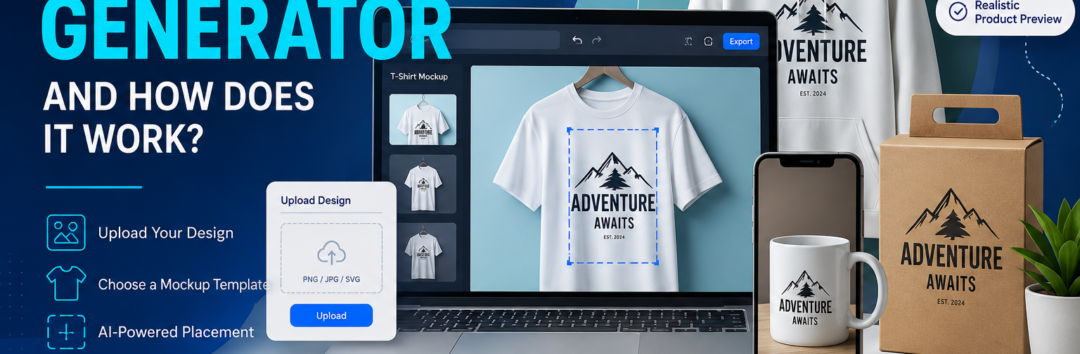
Are you want to know What Is a Mockup Generator and How Does It Work?
Discover what a mockup generator is, how it works, and why designers, ecommerce brands, and print-on-demand businesses use it. Learn about AI mockup generators, PSD mockups, product visualization, branding, and more.
Imagine launching a new clothing brand without spending thousands of dollars on professional photography. Or presenting a new mobile app to investors before a single line of code is fully developed. This is exactly where a mockup generator becomes an essential tool.
In today’s digital-first world, businesses need compelling visuals to capture attention. Whether you’re a graphic designer, entrepreneur, marketer, ecommerce seller, or print-on-demand business owner, creating realistic product previews quickly can significantly improve your workflow. Instead of manufacturing physical samples or organizing expensive photoshoots, you can create professional visuals in minutes.
A product mockup generator allows you to place your artwork, logo, or design onto realistic products such as T-shirts, mugs, packaging, smartphones, laptops, business cards, posters, or websites. These realistic previews help customers visualize the final product before it’s produced, increasing confidence and improving purchasing decisions.
Modern technology has taken this even further with the rise of the AI mockup generator. Rather than relying solely on pre-made templates, artificial intelligence can generate entirely new scenes, automate object placement, enhance realism, and even create marketing-ready images with minimal manual editing.
Whether you’re selling products through Shopify, Etsy, Amazon, WooCommerce, or your own website, mockups have become one of the fastest ways to produce high-quality visuals that convert visitors into buyers.
Throughout this guide, you’ll learn:
- What a mockup generator is
- How mockup generators work behind the scenes
- The technology powering modern AI mockups
- Different types of mockups
- Benefits for designers, marketers, and ecommerce businesses
- Best practices for creating professional mockups
By the end, you’ll understand why mockup generators have become indispensable tools in modern design and digital commerce.
What Is a Mockup Generator?
A mockup generator is a design tool that creates a realistic digital representation of a product, interface, or branding concept by placing your artwork onto professionally designed templates. Instead of producing a physical sample, you generate a highly realistic visual preview that shows exactly how your design will appear in the real world.
Think of it as a bridge between a simple graphic file and a finished product.
For example, if you’ve designed a company logo, you don’t want to show it as a flat PNG sitting on a white background. Instead, you can display it on:
- A coffee mug
- A premium business card
- Product packaging
- A shopping bag
- A storefront sign
- A laptop screen
- A smartphone
- A hoodie
- A baseball cap
Each of these becomes a product mockup that helps clients and customers imagine the final result.
Instead of asking someone to visualize your design, you’re showing them exactly what it will look like.
Mockup Generator vs Traditional Design
Years ago, creating realistic product presentations required advanced Photoshop skills.
Designers had to:
- Download a PSD mockup
- Open multiple layers
- Replace smart object layers manually
- Adjust perspective
- Match lighting
- Correct shadows
- Export several image versions
Although this method still works, it requires experience and significant time.
Today’s online mockup generators simplify the entire process.
Most platforms only require:
- Choose a product
- Perform a PNG upload
- Position your artwork
- Customize colors
- Download the finished image
The entire process often takes less than a minute.
Why Mockups Matter
Imagine you’re buying a custom T-shirt online.
Would you rather see:
- A flat logo on a white page
or
- A realistic person wearing the shirt in a lifestyle setting?
Most shoppers choose the second option because realistic visuals create trust.
A quality realistic product preview helps customers understand:
- Scale
- Colors
- Material appearance
- Print position
- Overall style
This is why mockups have become standard across ecommerce stores.
They improve:
- Customer confidence
- Brand credibility
- Product engagement
- Conversion rates
How Does a Mockup Generator Work?
Although modern mockup generators appear incredibly simple, several sophisticated technologies work together behind the scenes.
Let’s break down the process step by step.
Step 1: Choosing a Mockup Template
Everything begins with selecting a mockup template.
Templates are professionally created scenes that include realistic lighting, shadows, materials, textures, and camera angles.
Examples include:
- Folded T-shirts
- Coffee mugs
- Phone cases
- Shopping bags
- Product boxes
- Laptop screens
- Outdoor billboards
- Office desks
- Restaurant menus
- Cosmetic bottles
Many platforms organize these inside a searchable template library, allowing users to quickly find visuals that match their products or branding needs.
Rather than creating scenes from scratch, users start with polished, production-ready templates.
Step 2: Uploading Your Design
Next comes the design upload.
Most platforms support:
- PNG
- JPG
- SVG
- AI
- EPS
Transparent PNG files are particularly popular because they preserve clean edges without unwanted backgrounds.
The uploaded artwork becomes the design element that will be placed onto the selected product.
Whether it’s:
- A logo
- Illustration
- Typography
- Artwork
- Brand pattern
the software prepares it for realistic placement.
Step 3: Automatic Design Placement
After uploading, the software performs intelligent design placement.
This involves calculating:
- Position
- Scale
- Rotation
- Product dimensions
Rather than simply pasting an image onto the product, modern generators map the artwork naturally onto surfaces.
For example:
A logo placed on a curved mug wraps around the cylinder naturally.
Artwork placed on a folded hoodie bends with the fabric.
Graphics on a laptop lid align with the viewing angle.
This realism makes the finished result look authentic rather than digitally pasted.
Step 4: Surface Mapping and Perspective
One of the most technically impressive parts of a mockup generator is surface mapping.
Instead of treating every product as flat, software understands:
- Curves
- Edges
- Depth
- Material properties
Then comes perspective mapping, which adjusts artwork according to the camera angle.
If a notebook is photographed from above, the design automatically follows that perspective.
If a phone is angled at 45 degrees, the artwork tilts accordingly.
These calculations produce a much more believable presentation.
Step 5: Image Warping and Design Rendering
Real-world products rarely have perfectly flat surfaces.
To solve this, generators use image warping.
This bends artwork naturally around:
- Sleeves
- Bottles
- Boxes
- Fabric folds
- Cylinders
Next comes design rendering, where lighting, reflections, highlights, and shadows are blended into the artwork.
Instead of looking like a sticker pasted onto a product, the design appears printed directly on the material.
This subtle realism dramatically improves presentation quality.
Step 6: Background Customization
Once the product itself is complete, users often customize the surrounding environment.
Through background customization, you can:
- Change colors
- Replace scenes
- Add textures
- Create minimalist backgrounds
- Use office settings
- Add lifestyle environments
A clean white background works well for marketplaces like Amazon, while lifestyle scenes are often better for social media and brand storytelling.
Step 7: High-Resolution Export
After final adjustments, the mockup is ready for high-resolution export.
Most professional platforms allow downloads suitable for:
- Ecommerce websites
- Social media
- Advertisements
- Client presentations
- Print materials
- Catalogs
The exported images maintain clarity across different devices and screen sizes, ensuring your visuals remain sharp and professional.
Types of Mockup Generators and Their Real-World Applications
As digital commerce and online branding continue to evolve, mockup generators have expanded far beyond simple T-shirt previews. Today, businesses can create highly realistic visuals for nearly every type of product, digital interface, or branding asset imaginable.
Whether you’re launching a fashion label, presenting a mobile application to investors, or creating marketing materials for a new product, there’s a mockup designed specifically for your needs.
Let’s explore the most popular types of mockups and understand where each one delivers the greatest value.
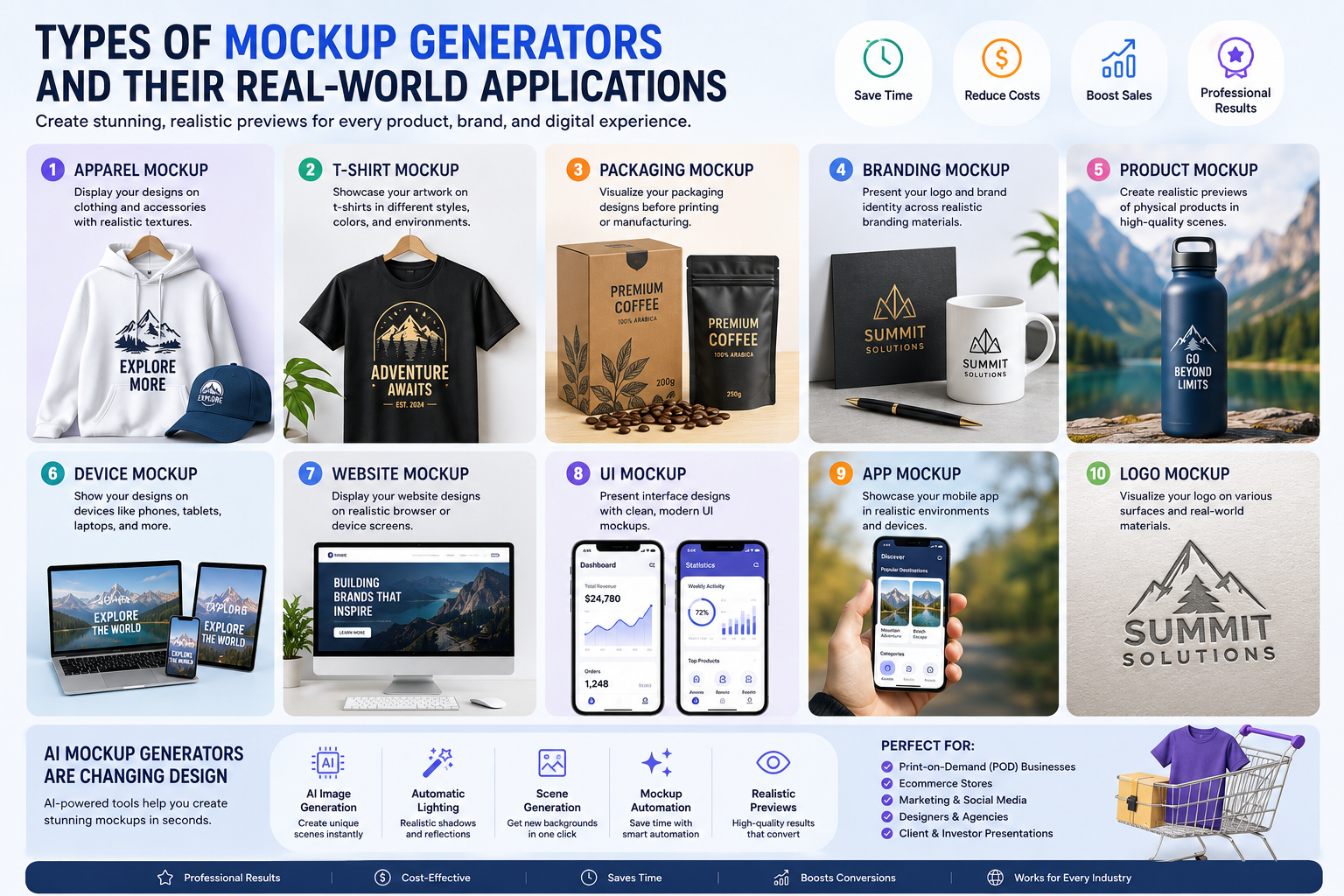
Different Types of Mockup Generators
Every business has unique visual requirements. A clothing brand needs apparel mockups, while a software company may focus on UI and website mockups. Understanding these categories helps you choose the right solution for your projects.
1. Apparel Mockup
One of the most widely used categories is the apparel mockup.
Instead of printing dozens of sample garments, designers simply upload artwork and instantly visualize how it appears on clothing.
Common apparel products include:
- T-shirts
- Hoodies
- Sweatshirts
- Polo shirts
- Tank tops
- Jackets
- Caps
- Tote bags
Fashion startups frequently rely on mockups before investing in inventory because they allow products to be showcased professionally with minimal cost.
For example, a new streetwear brand can design ten graphics in the morning and publish an entire online collection by afternoon—all without printing a single shirt.
2. T-Shirt Mockup
The T-shirt mockup deserves special attention because it has become the foundation of many ecommerce businesses.
Thousands of entrepreneurs launch print-on-demand stores using professionally designed T-shirt mockups.
These mockups typically allow users to customize:
- Shirt color
- Sleeve style
- Fabric appearance
- Front print
- Back print
- Neck label
- Pocket placement
Lifestyle scenes further enhance realism by showing models wearing the shirt in outdoor, office, gym, or casual environments.
This helps customers imagine themselves wearing the product, making purchase decisions much easier.
3. Packaging Mockup
For physical products, first impressions matter.
A packaging mockup helps businesses visualize branded packaging before manufacturing begins.
Examples include:
- Cosmetic boxes
- Medicine cartons
- Food packaging
- Coffee bags
- Gift boxes
- Shipping boxes
- Bottle labels
- Cans
- Tubes
- Jars
Instead of waiting weeks for production samples, companies can immediately review packaging concepts, colors, typography, and logo placement.
This speeds up approval cycles while reducing costly design revisions.
4. Branding Mockup
A logo rarely exists on its own.
Clients want to see how an identity system works across real business materials.
A branding mockup presents logos within realistic business environments, such as:
- Business cards
- Letterheads
- Shopping bags
- Office signage
- Employee ID cards
- Coffee cups
- Vehicles
- Storefronts
- Uniforms
Rather than presenting a flat logo, designers showcase an entire visual identity that tells a compelling brand story.
This significantly improves client presentations and approval rates.
5. Product Mockup
A product mockup simulates how a physical item will look after manufacturing.
Popular examples include:
- Coffee mugs
- Water bottles
- Mouse pads
- Posters
- Calendars
- Pillows
- Phone cases
- Notebooks
- Keychains
These previews are particularly valuable for ecommerce sellers because they replace expensive product photography during the early stages of product development.
Instead of waiting for production, businesses can immediately launch marketing campaigns.
6. Device Mockup
Digital products also need realistic presentations.
A device mockup displays designs on electronic hardware such as:
- Smartphones
- Tablets
- Desktop monitors
- Smartwatches
- Laptops
- TVs
App developers frequently use device mockups to demonstrate interfaces inside realistic hardware.
Instead of showing isolated screenshots, the application appears inside premium devices, creating a polished and professional presentation.
7. Website Mockup
When presenting a website concept, screenshots alone rarely impress clients.
A website mockup places an entire webpage inside realistic browser windows or computer monitors.
This allows agencies to demonstrate:
- Homepage layouts
- Landing pages
- Ecommerce stores
- Corporate websites
- Portfolio sites
- SaaS dashboards
Website mockups help stakeholders visualize the final product long before development begins.
8. UI Mockup
Designers often create a UI mockup after completing the initial wireframe.
Unlike rough sketches, UI mockups include:
- Colors
- Icons
- Buttons
- Typography
- Cards
- Navigation
- Interactive components
They communicate exactly how the interface will appear once developed.
Product teams use these mockups for design reviews, usability testing, and stakeholder approval.
9. App Mockup
An app mockup showcases mobile applications within realistic smartphone environments.
Instead of displaying flat screenshots, designers create engaging promotional visuals featuring:
- Home screens
- Login pages
- Dashboard views
- Shopping carts
- Analytics
- User profiles
These visuals are commonly used for:
- App Store listings
- Google Play listings
- Landing pages
- Investor presentations
- Social media advertisements
Professional app mockups dramatically improve perceived product quality.
10. Logo Mockup
Logo presentations become far more compelling when clients see them in real-life situations.
A logo mockup displays branding on materials such as:
- Embossed paper
- Metal signage
- Glass walls
- Storefronts
- Leather products
- Packaging
- Uniforms
Instead of guessing how a logo might appear, clients receive an accurate visual representation.
How AI Mockup Generators Are Changing Design
Traditional mockup software relies on fixed templates.
Artificial intelligence introduces an entirely new level of automation.
An AI mockup generator can:
- Generate new backgrounds automatically
- Improve lighting
- Create realistic shadows
- Replace environments
- Suggest layouts
- Enhance product positioning
- Produce multiple variations instantly
Rather than spending hours editing images manually, AI dramatically accelerates production while maintaining professional quality.
AI Image Generation Meets Mockup Design
One of the biggest innovations in recent years is combining AI image generation with mockup technology.
Instead of searching for stock photographs, users can generate completely original scenes.
Imagine typing:
“A luxury skincare bottle on a marble countertop surrounded by fresh flowers and soft morning sunlight.”
Within seconds, AI can produce a unique scene that becomes the perfect backdrop for your product.
This gives brands unlimited creative possibilities without organizing expensive photoshoots.
Faster Product Visualization
Businesses often struggle to communicate ideas before manufacturing begins.
Product visualization solves this problem by transforming concepts into highly realistic digital representations.
Instead of relying on imagination, teams can evaluate:
- Colors
- Materials
- Shapes
- Branding
- Packaging
- Product proportions
This reduces misunderstandings between designers, manufacturers, and marketing teams.
Creating a Realistic Product Preview
Consumers buy with their eyes.
A high-quality realistic product preview gives shoppers confidence because they can clearly see what they’re purchasing.
The most convincing previews include:
- Accurate shadows
- Material textures
- Natural reflections
- Proper lighting
- High-resolution graphics
- Correct proportions
The more realistic the preview appears, the more trustworthy the product becomes.
Supporting Print-on-Demand Businesses
One of the biggest industries benefiting from mockup generators is Print-on-demand (POD).
POD companies manufacture products only after customers place orders.
Because inventory isn’t produced in advance, businesses rely heavily on mockups to display products online.
Popular POD products include:
- T-shirts
- Hoodies
- Posters
- Mugs
- Tote bags
- Stickers
- Phone cases
- Canvas prints
Without professional mockups, launching hundreds of products would require an enormous investment in photography.
Instead, sellers can build complete catalogs within hours.
A Cost-Effective Product Photography Alternative
Professional photography is expensive.
You need:
- Studio rental
- Cameras
- Lighting equipment
- Models
- Photographers
- Editing software
For startups, these costs add up quickly.
A mockup generator serves as an excellent product photography alternative, allowing businesses to create polished visuals for a fraction of the cost.
Although photography still plays an important role for premium product launches, mockups provide an ideal solution for product testing, validation, and early-stage marketing.
Creating Ecommerce Product Images That Convert
High-quality ecommerce product images directly influence buying decisions.
Professional mockups help online stores maintain consistency across:
- Shopify
- WooCommerce
- Etsy
- Amazon
- eBay
- Walmart Marketplace
Instead of inconsistent photographs, businesses can create a uniform visual identity that strengthens customer trust and improves brand recognition.
Building Better Product Showcases
A compelling product showcase tells a story rather than simply displaying an item.
For example, instead of showing only a coffee mug, a showcase might include:
- A wooden desk
- A laptop
- A notebook
- Natural lighting
- Indoor plants
This contextual presentation helps customers imagine using the product in their everyday lives.
Enhancing Marketing Visuals
Modern marketing requires content across dozens of platforms.
Professional mockups can be transformed into powerful marketing visuals for:
- Instagram posts
- Facebook ads
- Pinterest pins
- LinkedIn campaigns
- Email newsletters
- Product catalogs
- Digital brochures
Using the same branded mockup across multiple channels creates visual consistency and reinforces brand identity.
Preparing Online Store Listings
When launching a new product, sellers often need dozens of images for an online store listing.
Instead of scheduling multiple photoshoots, mockup generators allow businesses to create:
- Front views
- Side views
- Lifestyle scenes
- Zoomed details
- Packaging previews
- Color variations
This speeds up product launches while keeping image quality consistently high.
The Complete Mockup Creation Workflow
Professional designers rarely jump straight into creating a mockup. Instead, they follow a structured process that ensures consistency and quality.
A typical workflow looks like this:
- Plan the concept
- Create the design
- Choose the right mockup
- Upload the artwork
- Customize the scene
- Export the final image
- Publish across marketing channels
Let’s examine each stage in detail.
Step 1: Start with a Wireframe or Prototype
Every successful design begins with an idea.
For digital products such as websites and mobile apps, designers often create a wireframe before focusing on visuals. A wireframe outlines the structure of a page or interface, helping teams decide where navigation, content, and interactive elements should appear.
Once the structure is approved, it evolves into a prototype, which demonstrates how users will interact with the product. Prototypes can include clickable buttons, page transitions, and simulated user flows.
Although mockups and prototypes serve different purposes, they complement each other perfectly. The prototype defines functionality, while the mockup presents the finished appearance.
Step 2: Prepare High-Quality Design Assets
Before generating any mockup, make sure your design assets are production-ready.
These assets may include:
- Logo files
- Brand colors
- Typography
- Product illustrations
- Icons
- Artwork
- Patterns
- Packaging graphics
Using high-resolution source files ensures the final mockup remains crisp, even when viewed on large screens or printed in marketing materials.
Organizing your assets in advance also speeds up future design projects.
Step 3: Upload Your Artwork
After selecting the appropriate product, it’s time for the design upload.
Most online tools provide a drag-and-drop editor, making the process intuitive even for beginners.
Instead of learning complex software, users simply:
- Drag the design file into the editor
- Resize it
- Rotate it
- Position it
- Preview the results
This user-friendly approach allows entrepreneurs, marketers, and small business owners to create professional visuals without graphic design expertise.
Step 4: Customize Your Mockup
Not every project fits a standard template.
Sometimes you’ll need a custom mockup that better represents your brand identity.
Customization options often include:
- Product color
- Fabric texture
- Background
- Lighting
- Camera angle
- Shadow intensity
- Reflection
- Object arrangement
These adjustments help create unique visuals instead of generic templates used by thousands of other businesses.
Step 5: Leverage Layered PSD Files
Although online generators are convenient, experienced designers still appreciate the flexibility of a layered PSD file.
Layered Photoshop documents allow complete control over every element, including:
- Shadows
- Highlights
- Textures
- Backgrounds
- Color grading
- Blend modes
This is especially useful for agencies handling premium branding projects where pixel-perfect precision matters.
For users familiar with Photoshop, layered PSD mockups provide virtually unlimited creative possibilities.
Step 6: Personalize Products for Different Customers
Many businesses offer customized merchandise.
Using mockups, brands can preview product customization before production.
For example:
A customer orders a personalized coffee mug with their name.
Instead of waiting for manufacturing, the business instantly generates a preview showing:
- Name placement
- Font style
- Color combination
- Print size
This reduces errors while improving customer satisfaction.
Step 7: Build a Professional Brand Presentation
Great branding goes beyond a logo.
A polished brand presentation demonstrates how visual identity appears consistently across multiple touchpoints.
Examples include:
- Packaging
- Business cards
- Website
- Mobile app
- Social media
- Store signage
- Merchandise
- Marketing materials
Presenting branding this way helps stakeholders understand the complete customer experience rather than isolated design elements.
Step 8: Impress Clients with Better Presentations
Freelancers and agencies frequently use mockups during a client presentation.
Instead of delivering flat image files, they showcase designs in realistic environments.
For example:
Instead of emailing a logo on a white background, present it on:
- Premium stationery
- Building signage
- Coffee cups
- Product packaging
- Employee uniforms
Clients often find it much easier to approve concepts when they can visualize the final outcome.
Professional presentations also communicate attention to detail and increase perceived value.
Benefits of Using a Mockup Generator
Businesses across industries rely on mockups because they provide practical advantages that extend far beyond aesthetics.
Some of the most significant benefits include:
Saves Time
Instead of arranging photoshoots or creating complex Photoshop compositions, businesses can generate realistic visuals within minutes.
Reduces Costs
Mockups eliminate many expenses associated with:
- Studio rentals
- Product samples
- Photography
- Editing
- Printing
This makes them especially valuable for startups and small businesses.
Improves Collaboration
Designers, marketers, developers, and clients can review concepts before manufacturing or development begins.
This reduces misunderstandings and shortens approval cycles.
Speeds Up Product Launches
Businesses no longer need to wait for inventory before promoting new products.
They can begin marketing immediately using realistic previews.
Creates Consistent Branding
Using the same visual style across products, websites, advertisements, and social media strengthens brand recognition.
Common Mistakes to Avoid
Even experienced designers occasionally make mistakes when creating mockups.
Here are some of the most common issues:
Using Low-Resolution Artwork
Blurry graphics immediately reduce professionalism.
Always upload high-quality source files.
Ignoring Product Dimensions
Stretching artwork beyond realistic proportions creates unnatural results.
Ensure designs match actual product sizes.
Choosing Unrealistic Backgrounds
The environment should complement your product rather than distract from it.
Simple, clean compositions often perform better.
Overusing Effects
Too many shadows, reflections, or dramatic lighting can make mockups appear artificial.
Aim for subtle realism.
Using Generic Templates Everywhere
If every image looks identical to competitors, your brand loses uniqueness.
Customize colors, backgrounds, and layouts whenever possible.
The Future of Mockup Generators
The next generation of mockup technology will become even more intelligent.
Artificial intelligence will continue improving:
- Scene generation
- Product recognition
- Automatic lighting
- Material simulation
- Background replacement
- Object detection
- Personalized recommendations
- Interactive 3D previews
Future tools may even generate entire marketing campaigns from a single product image.
Imagine uploading only a logo and receiving:
- Product mockups
- Social media graphics
- Website banners
- Advertising creatives
- Email marketing visuals
—all created automatically.
As AI continues evolving, mockup generation will become an even more powerful asset for businesses of every size.
Conclusion
A mockup generator has become one of the most valuable tools in modern design, branding, and ecommerce. It enables businesses to transform simple artwork into realistic product presentations without the cost and complexity of traditional photography or manual editing.
Whether you’re creating a product mockup for an online store, showcasing a branding mockup to a client, designing a website mockup, or generating an app mockup for investors, these tools dramatically simplify the creative process.
The rise of the AI mockup generator is making the workflow even more efficient. Features like intelligent scene generation, automated design placement, realistic lighting, and AI-powered enhancements allow anyone—from beginners to experienced designers—to create high-quality visuals in minutes.
If you’re looking to improve your product presentations, strengthen your branding, or launch products faster, investing time in learning mockup generators is well worth it. With the right workflow and attention to detail, you can create visuals that inspire confidence, tell your brand story, and drive more engagement across every marketing channel.
Frequently Asked Questions (FAQs)
1. What is a mockup generator?
A mockup generator is a tool that creates realistic digital previews by placing your designs onto products, devices, packaging, or branding materials.
2. How does a mockup generator work?
It maps uploaded artwork onto pre-designed templates using perspective, surface mapping, and rendering techniques to create realistic visuals.
3. What is the difference between a mockup and a prototype?
A mockup shows the visual appearance of a design, while a prototype demonstrates functionality and user interactions.
4. What is an AI mockup generator?
An AI mockup generator uses artificial intelligence to automate scene creation, lighting, background generation, and design placement.
5. Are mockup generators free?
Many platforms offer free plans with limited templates, while premium subscriptions provide advanced features and larger template libraries.
6. Can beginners use mockup generators?
Yes. Most tools feature intuitive drag-and-drop editors that require little or no design experience.
7. What file formats can I upload?
Most platforms support PNG, JPG, SVG, PDF, AI, and EPS files.
8. Why are transparent PNG files recommended?
Transparent PNGs preserve clean edges and allow artwork to blend naturally with products.
9. Can I use mockups for ecommerce?
Absolutely. Mockups are widely used for Shopify, WooCommerce, Etsy, Amazon, and other online marketplaces.
10. Are mockups a replacement for product photography?
They are an excellent alternative during product development and testing, though professional photography may still be beneficial for certain campaigns.
11. What products can I create mockups for?
Common options include apparel, mugs, packaging, phone cases, posters, stationery, devices, and more.
12. Do mockups help increase sales?
Professional visuals can improve customer trust, engagement, and conversion rates.
13. What is a PSD mockup?
A PSD mockup is a layered Photoshop file that allows designers to edit and customize mockups in detail.
14. What are Smart Objects?
Smart Objects are Photoshop layers that let users replace artwork quickly while preserving perspective and effects.
15. Can AI generate custom backgrounds?
Yes. Many modern AI tools can create unique scenes and environments based on text prompts.
16. Are mockups suitable for branding presentations?
Yes. They help showcase logos and brand assets in realistic business contexts.
17. Can I create mockups without Photoshop?
Yes. Many online tools require only a web browser.
18. What industries benefit from mockup generators?
Fashion, ecommerce, SaaS, marketing, packaging, branding, print-on-demand, publishing, and manufacturing.
19. What is the biggest advantage of mockups?
They save time and money while creating realistic, professional visuals.
20. Should I customize templates?
Yes. Customizing templates helps your brand stand out and avoids generic-looking visuals.
21. Can mockups be used in social media marketing?
Yes. They are ideal for ads, posts, stories, and promotional campaigns.
22. What is product visualization?
It is the process of creating realistic digital representations of products before manufacturing.
23. Are mockups useful for client approvals?
Yes. They make it easier for clients to visualize the final outcome.
24. What is a template library?
A collection of ready-made mockup templates organized by category.
25. Can mockups be exported in high resolution?
Most professional tools support high-resolution downloads suitable for web and print.
26. Are 3D mockups better than flat images?
For many products, 3D mockups provide a more immersive and realistic presentation.
27. Can I create custom product variations?
Yes. Many generators support color, texture, and design variations.
28. How do mockups help print-on-demand businesses?
They enable sellers to showcase products before manufacturing, reducing upfront costs.
29. What should I avoid when creating mockups?
Low-resolution artwork, unrealistic backgrounds, poor alignment, and excessive visual effects.
30. Are mockup generators worth using?
Yes. They streamline design workflows, improve presentations, reduce costs, and help businesses create professional visuals efficiently.